June 2, 2026
Lead Ads Email Validation: Route Meta and LinkedIn Leads Before CRM Pollution
Lead ads can move a prospect from scroll to CRM in seconds. Put email validation between capture and routing so fake, typoed, disposable, and unreachable leads do not consume sales time or lifecycle spend.
Executive Summary
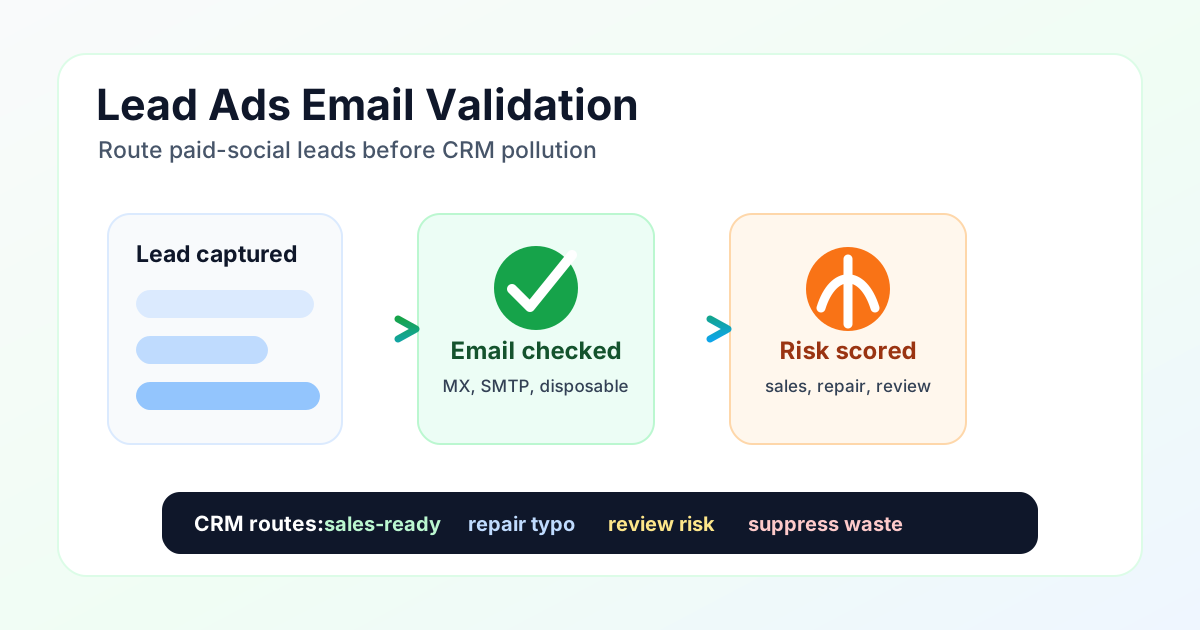
Paid-social lead quality is an intake problem before it is a sales problem. Validate the submitted email before CRM routing, then classify each record as sales-ready, repair, review, or suppress. This protects speed-to-lead workflows, lowers wasted follow-up, and gives marketing a clean read on which forms, campaigns, and partners produce reachable buyers.
What is lead ads email validation?
Lead ads email validation checks the email address from a paid-social form before the record is assigned to sales, synced to marketing automation, or used for retargeting. The validation step can run in a CRM connector, automation workflow, webhook listener, API route, or a nightly CSV cleanup job. The goal is not to slow good leads down. The goal is to stop bad records from moving at the same speed as real buyers.
LinkedIn describes Lead Gen Forms as prefilled forms that can sync lead data directly to marketing automation platforms, CRMs, or CDPs in its Lead Gen Forms integration guidance. That is useful for speed, but it also means an invalid email can enter automated workflows quickly. Meta has also been public about 2026 scam-ad enforcement and its use of AI to detect abusive ad behavior. For operators, the takeaway is practical: form capture and form quality need separate controls.
Why lead-ad quality breaks down
Lead forms are designed to reduce friction. That is why they work. A buyer can open a form, submit prefilled contact data, and reach your CRM without typing much. Low friction also attracts accidental submissions, poor-fit contacts, temporary inboxes, typoed addresses, and people who engage with content but have no buying intent. Cheap cost per lead can hide expensive cost per qualified opportunity.
A 2026 academic study of the lead marketing ecosystem observed aggressive data sharing, rapid follow-up, and fabricated or augmented attributes in brokered lead flows. That research is not limited to paid-social lead ads, but it shows why marketing operations teams should treat lead intake as a data-quality surface. A lead record is not clean just because a platform form submitted successfully.
Validation gates for paid-social leads
The gate belongs before CRM assignment. Capture the payload, call the Email-Check.app API, attach a score and reason code, then route the lead. A sales-ready lead can keep the fast SLA. A repair lead can receive a correction prompt. A review lead can wait for manual triage. A suppressed lead should never create a noisy sales task.
Lead source comparison
| Lead source | Quality risk | Validation gate |
|---|---|---|
| Meta lead ads | Low-friction forms can produce cheap leads that still fail sales follow-up. | Validate before CRM creation, then send only clean records into speed-to-lead queues. |
| LinkedIn Lead Gen Forms | Prefilled work-profile data helps conversion, but stale or role-based emails can still enter routing. | Score email and domain context before assigning account owner, SLA, and nurture path. |
| Document, webinar, and demo ads | High-intent assets attract real buyers and low-quality form fillers at the same time. | Use repair and review routes so a typo does not become a lost lead. |
| Agency or partner lead exports | CSV files often arrive after the campaign, when source quality is harder to diagnose. | Run bulk validation and report invalid rate by partner, form, and creative. |
Signals to score before routing
Email-Check.app checks syntax, DNS and MX records, SMTP mailbox reachability without sending mail, disposable domains, typo suggestions, name extraction, domain age, and a risk score. Those signals answer the questions a CRM cannot answer on its own: is the address reachable, is the domain real, is this a temporary inbox, is the record probably typoed, and should this lead create sales work right now?
The routing policy should match the business motion. A high-value B2B demo form might review uncertain catch-all domains instead of blocking them. A consumer promo form might suppress disposable domains immediately. A webinar form might repair typos and still send a calendar reminder after confirmation. The rule is local to the workflow; the validation signal stays consistent.
Lead routing table
| Route | Validation criteria | CRM action |
|---|---|---|
| Sales-ready | Valid format, MX exists, SMTP signal is strong, no disposable flag, score at or above 70. | Create or update the CRM lead, start SLA timer, and send to sales or lifecycle automation. |
| Repair | The email looks like a real buyer with a likely typo such as gmial.com or yaho.com. | Ask for correction on the thank-you page, through SMS, or in the first follow-up task. |
| Review | Catch-all domain, uncertain SMTP, role account, low score, or mismatched form data. | Hold from auto-assignment until marketing ops or SDR triage checks context. |
| Suppress | Malformed address, missing MX, disposable domain, or confirmed unreachable mailbox. | Exclude from paid follow-up, report source waste, and avoid creating a noisy CRM contact. |
REST API example
This request validates one paid-social lead email before the CRM record is created. Use the response to write route, reason, and score fields back to your automation platform.
curl -G "https://api.email-check.app/v1-get-email-details" \
  -H "accept: application/json" \
  -H "x-api-key: YOUR_API_KEY" \
  --data-urlencode "email=lead@temporary-inbox.example" \
  --data-urlencode "verifyMx=true" \
  --data-urlencode "verifySmtp=true" \
  --data-urlencode "suggestDomain=true" \
  --data-urlencode "detectName=true" \
  --data-urlencode "checkDomainAge=true"
JavaScript lead-routing example
The example below treats validation failures as review instead of dropping the lead. That keeps the automation resilient if the network is unavailable while still blocking obvious invalid and disposable records when the API returns a clear result.
type LeadAdPayload = {
  email: string;
  firstName?: string;
  lastName?: string;
  campaignId?: string;
  formId?: string;
  source: "meta" | "linkedin" | "csv" | "other";
};

type EmailCheckResult = {
  validFormat: boolean;
  validMx: boolean | null;
  validSmtp: boolean | null;
  isDisposable: boolean;
  score?: number;
  domainSuggestion?: { suggested?: string | null } | null;
};

type LeadRoute = "sales_ready" | "repair" | "review" | "suppress";

function routeLead(result: EmailCheckResult): LeadRoute {
  if (!result.validFormat || result.domainSuggestion?.suggested) {
    return "repair";
  }

  if (!result.validMx || result.isDisposable) {
    return "suppress";
  }

  if (!result.validSmtp || (result.score ?? 0) < 70) {
    return "review";
  }

  return "sales_ready";
}

export async function scoreLeadAdSubmission(lead: LeadAdPayload) {
  const params = new URLSearchParams({
    email: lead.email,
    verifyMx: "true",
    verifySmtp: "true",
    suggestDomain: "true",
    detectName: "true",
    checkDomainAge: "true",
  });

  const response = await fetch("https://api.email-check.app/v1-get-email-details?" + params, {
    headers: {
      accept: "application/json",
      "x-api-key": process.env.EMAIL_CHECK_API_KEY ?? "",
    },
  });

  if (!response.ok) {
    return { route: "review" as const, reason: "validation_unavailable", lead };
  }

  const result = (await response.json()) as EmailCheckResult;

  return {
    route: routeLead(result),
    reason: result.domainSuggestion?.suggested ? "possible_typo" : "validated",
    score: result.score ?? 0,
    lead,
  };
}
Python CSV cleanup example
Real-time validation is best for speed-to-lead, but historical CSV exports still matter. Run bulk cleanup on past forms to see which campaigns produced unreachable, disposable, typoed, and review-heavy records.
import csv
import requests

API_KEY = "YOUR_API_KEY"

def validate(email: str) -> dict:
    response = requests.get(
        "https://api.email-check.app/v1-get-email-details",
        headers={"accept": "application/json", "x-api-key": API_KEY},
        params={
            "email": email,
            "verifyMx": "true",
            "verifySmtp": "true",
            "suggestDomain": "true",
            "detectName": "true",
            "checkDomainAge": "true",
        },
        timeout=10,
    )
    response.raise_for_status()
    return response.json()

with open("lead-ad-export.csv", newline="") as source, open("lead-ad-routes.csv", "w", newline="") as target:
    reader = csv.DictReader(source)
    fieldnames = [*reader.fieldnames, "email_score", "lead_route", "validation_reason"]
    writer = csv.DictWriter(target, fieldnames=fieldnames)
    writer.writeheader()

    for row in reader:
        result = validate(row["email"])
        reason = "validated"
        route = "sales_ready"

        if result.get("domainSuggestion"):
            route = "repair"
            reason = "possible_typo"
        elif result.get("isDisposable") or result.get("validMx") is False:
            route = "suppress"
            reason = "invalid_or_disposable"
        elif result.get("validSmtp") is False or result.get("score", 0) < 70:
            route = "review"
            reason = "uncertain_mailbox"

        writer.writerow({
            **row,
            "email_score": result.get("score", 0),
            "lead_route": route,
            "validation_reason": reason,
        })
Metrics that show real lead quality
Cost per lead is not enough. Track invalid rate, disposable rate, typo recovery, review rate, contactability, time to first qualified touch, meeting booked rate, and revenue per clean lead. Then compare those metrics by campaign, creative, form, placement, audience, and partner. A form with low CPL and high suppress rate is not efficient. It is simply pushing cleanup cost into sales and lifecycle teams.
A useful first benchmark is the before-and-after route mix. If 87 percent of obvious fake or unusable records can be removed from follow-up and typo recovery saves 7 percent of otherwise lost leads, sales gets fewer bad tasks while marketing keeps more legitimate buyers. That is the path from cheap leads to usable pipeline.
Where this fits in your validation stack
Use email validation for the signal model, disposable email detection for temporary inbox defense, lead generation validation for form quality, and fraud prevention for abuse-heavy workflows. Related playbooks include gated content validation, lead form spam prevention, and Customer Match audience hygiene.
FAQ
Should validation happen before or after CRM creation?
Before, when possible. If your connector cannot block creation, write route and reason fields immediately after capture so sales assignment, lifecycle messaging, and reporting still use validation data.
Should disposable emails always be blocked?
For paid lead ads, usually yes. A temporary inbox rarely deserves a sales SLA. If the asset is low-risk, you can route disposable records to nurture suppression instead of hard deletion.
Can validation improve ad optimization?
It can improve the quality of the offline signals you send back. If the ad platform learns only from raw form submissions, it may optimize for cheap form fillers. If your CRM sends qualified-lead outcomes, the feedback loop gets cleaner.
Validate leads before the CRM queue
Add email checks to paid-social intake, route risky records, and report source quality before your sales team spends time on bad data.