Email Validation / API Guide / Data Quality
Email Verification Unknown Status: What to Do Next in 2026
Keep good leads in review and uncertain addresses out of campaigns. A practical guide to SMTP results, retries, and signup decisions.
Email-Check.app Team · · 9 min read
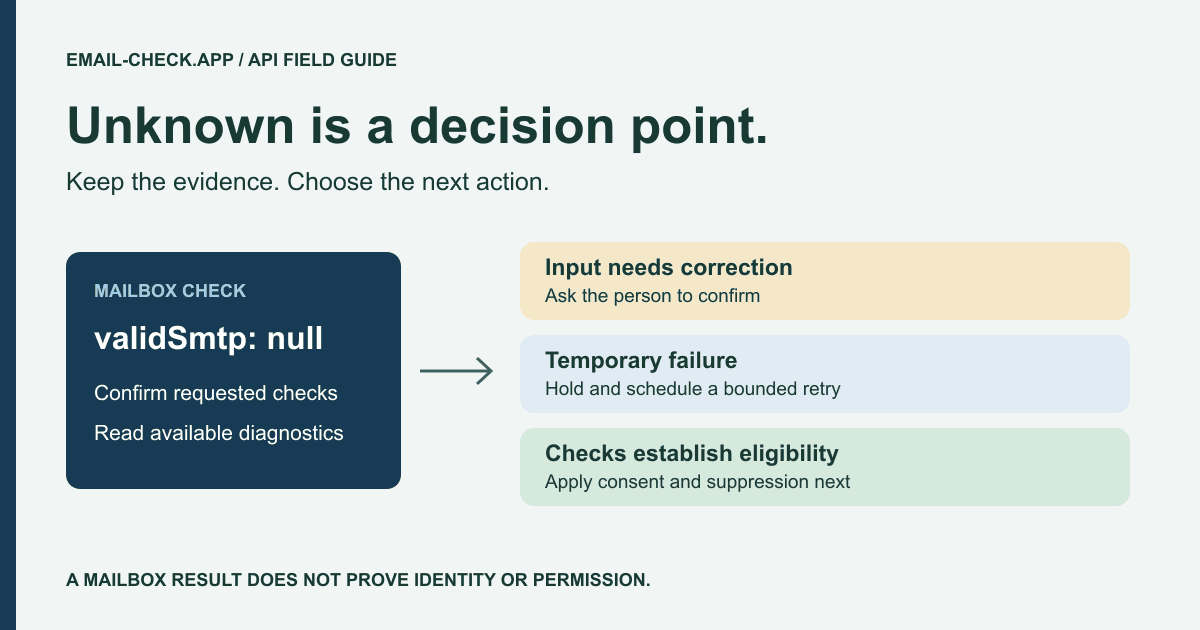
A sales rep uploads a prospect file. Most addresses pass, a few fail, and the rest sit in an uncertain bucket. Deleting that bucket may discard real buyers. Sending to everyone turns an unanswered technical question into a campaign risk.
The useful decision is to hold those records, identify why the check was inconclusive, and retry only when another attempt can add information. This guide explains that process using Email-Check.app's actual response fields. It applies to B2B lead generation, SaaS registration, and existing customer databases.
What is an unknown email verification status?
An unknown email verification result means the check did not establish a conclusive answer about mailbox reachability. The server may be unavailable, restrict verification, or provide insufficient evidence. Treat the address as unresolved: investigate or retry it, while keeping it out of automatic campaign approval.
Vendors express uncertainty differently. Hunter's August 2026 troubleshooting guidance describes privacy restrictions, blocked checks, and unreachable servers. Bouncer's verification FAQ separates unknown results from invalid addresses. Those distinctions matter when migrating data between tools.
Email-Check.app's single-address API uses nullable validMx and validSmtp fields rather than a universal status: unknown label. Its published schema permits null. Your application must preserve that distinction instead of collapsing every non-true value into an invalid address.
First confirm that you requested the check. MX and SMTP verification default to disabled in the API contract. A missing conclusion from an unrequested check is not evidence of a broken mailbox. The current API reference lists the options and response types.
Why SMTP verification can be inconclusive
A domain can exist while a mailbox remains uncertain
Syntax checks inspect the address format, including supported RFC 5322 conventions. DNS and MX checks inspect domain routing. Neither proves that the named mailbox exists. SMTP verification adds a conversation with the receiving server without sending a message body, but the server controls how much it reveals.
Temporary errors differ from permanent rejection
RFC 5321 distinguishes temporary 4xx responses from permanent 5xx responses. Read the diagnostic context as well as the first digit. A server policy rejection is not automatically proof that the person typed an invalid mailbox. Connection failures may produce no SMTP reply at all.
Greylisting temporarily defers unfamiliar senders or sessions. Some servers also delay replies or block probes. Retrying immediately can repeat the same condition. Your workflow needs a waiting period and a limit, not a loop that runs until it gets the answer you want.
Catch-all behavior is a separate question
A catch-all domain may accept recipients that do not correspond to individual mailboxes. That makes a positive SMTP response less conclusive. It differs from a timeout: one provides ambiguous acceptance, while the other may provide no answer. Keep those reasons separate in reporting.
When requested and available, smtpDebug can include responseCode, enhancedStatus, reason, and isCatchAll. These are optional diagnostics. Do not interpret an absent catch-all field as proof that the domain is not catch-all.
| Evidence | What it establishes | Next action |
|---|---|---|
| Invalid syntax | The input fails supported address rules | Request correction |
| MX available | The domain has mail routing information | Continue mailbox checks |
| SMTP null or connection failure | No conclusive mailbox result | Review options and consider retry |
| SMTP rejection | The server rejected this check | Inspect reason before classifying |
| SMTP accepted, catch-all detected | Acceptance may not identify one mailbox | Use a separate risk policy |
| Disposable provider | A temporary mailbox service was identified | Apply your lifecycle eligibility policy |
How to handle unknown results without losing good leads
1. Confirm which checks actually ran
Request MX and SMTP verification explicitly. Keep the original response and check time, and distinguish an API failure from an inconclusive mailbox result.
2. Separate address problems from temporary failures
Request corrections for malformed addresses. Review server diagnostics for connection errors, temporary responses, policy blocks, and catch-all behavior instead of treating them as the same problem.
3. Schedule a bounded retry
Retry temporary failures after a delay in a background job, with a maximum attempt count. Keep the contact out of automated campaigns until its disposition is resolved.
4. Record and enforce the decision
Store a campaign decision alongside the original result. Recheck changed addresses, preserve suppression records, and measure recovered contacts against later delivery outcomes.
For an internal starting policy, you might allow two background retries, first after an hour and then the next day. Those intervals are illustrative, not product defaults or an SMTP guarantee. Adjust them to your deadline, provider guidance, and observed recovery rate.
Keep the raw validation facts separate from your business action. Fields such as checkedAt, attemptCount, and campaignDecision belong in your own integration. They are not additional fields promised by the API. Preserve enough history to explain a changed decision without storing unnecessary diagnostics indefinitely.
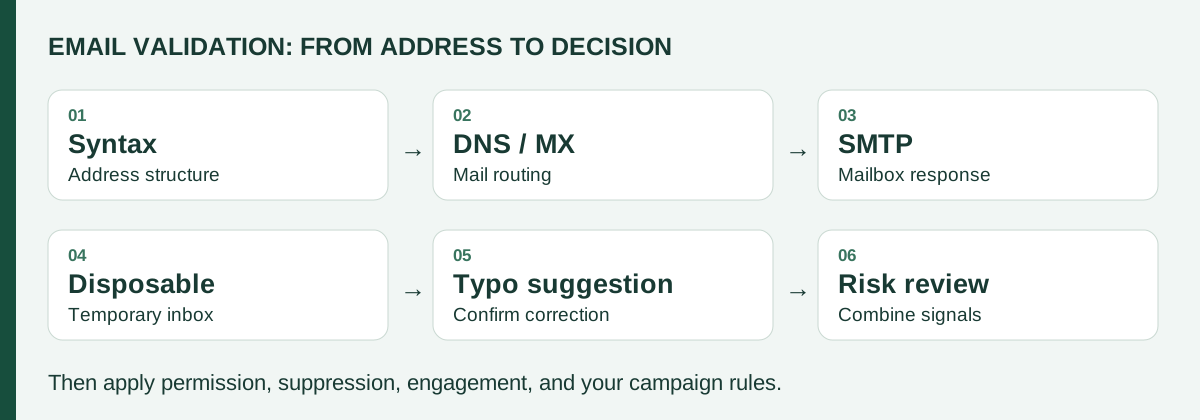
Disposable detection, typo suggestions, and risk scoring add context. A gmial.com suggestion should prompt a user correction, not an automatic rewrite. A low score may justify review, but it does not prove fraud. Read the disposable-address guide and catch-all risk guide for those distinct decisions.
API examples: preserve uncertainty in your integration
These examples call the documented REST endpoint directly. Use your own server-side secret and an address you are authorized to validate. Standard HTTP clients let you add the same request to an existing backend without installing another package.
cURL: request optional SMTP diagnostics
curl --get 'https://api.email-check.app/v1-get-email-details' \
  --header "x-api-key: $EMAIL_CHECK_API_KEY" \
  --data-urlencode 'email=lead@example.com' \
  --data-urlencode 'verifyMx=true' \
  --data-urlencode 'verifySmtp=true' \
  --data-urlencode 'smtpDebug=true' \
  --data-urlencode 'suggestDomain=true' \
  --data-urlencode 'timeout=5000'
The request timeout parameter is measured in milliseconds and capped at 10,000 by the schema. A larger deadline does not force a receiving server to disclose a mailbox. Keep your HTTP client deadline separate, because the full request includes more than the SMTP check.
JavaScript: choose an explicit review state
// Server-side JavaScript; submittedEmail comes from your validated form.
const url = new URL('https://api.email-check.app/v1-get-email-details');
url.search = new URLSearchParams({
  email: submittedEmail, verifyMx: 'true', verifySmtp: 'true',
  smtpDebug: 'true', suggestDomain: 'true', timeout: '5000',
}).toString();
const response = await fetch(url, {
  headers: { 'x-api-key': process.env.EMAIL_CHECK_API_KEY },
  signal: AbortSignal.timeout(12000),
});
if (!response.ok) throw new Error('Validation request failed');
const result = await response.json();
let decision = 'review'; // Your application label, not an API status.
if (result.validFormat === false || result.domainSuggestion?.suggested) {
  decision = 'request_correction';
} else if (result.isDisposable === true) {
  decision = 'exclude_from_lifecycle';
} else if (!result.error && result.validFormat === true &&
  result.validMx === true && result.validSmtp === true &&
  result.isDisposable === false && result.smtpDebug?.isCatchAll === false) {
  decision = 'check_consent';
}
// Null, false, missing catch-all evidence, and errors stay in review.
// Persist decision and checkedAt in your own system; never log the API key.
This conservative example holds incomplete evidence for review. Your production handler must also handle network errors, authentication problems, exhausted credits, and rate limits. An HTTP failure is an integration problem, not an address verdict. Avoid returning debug transcripts to a public signup form.
Python: distinguish null from a negative result
import json
import os
from urllib.parse import urlencode
from urllib.request import Request, urlopen

params = urlencode({
    'email': 'lead@example.com',
    'verifyMx': 'true', 'verifySmtp': 'true',
    'smtpDebug': 'true', 'timeout': '5000',
})
request = Request(
    'https://api.email-check.app/v1-get-email-details?' + params,
    headers={'x-api-key': os.environ['EMAIL_CHECK_API_KEY']},
)
with urlopen(request, timeout=12) as response:
    result = json.load(response)
if result.get('validSmtp') is None:
    print('Review required: SMTP result is inconclusive or absent')
# A scheduler can retry later. Do not loop until the result becomes true.
Send failures to a bounded retry queue or an operator. Respect rate-limit responses and avoid putting the API key in a query string that may appear in logs. The SMTP verification guide explains how checks can work without delivering an email.
Use different policies for signup forms and bulk cleaning
| Workflow | User expectation | Uncertain result |
|---|---|---|
| SaaS signup | Finish registration promptly | Preserve a pending account and confirm ownership separately |
| Ecommerce checkout | Complete the purchase | Offer correction without discarding the basket |
| B2B demo request | Receive a relevant response | Keep the request for manual review |
| Bulk campaign | Receive expected marketing | Hold unresolved records outside the send segment |
For fake-account prevention, combine validation with request limits, abuse monitoring, and ownership confirmation. A valid mailbox can still belong to an attacker. A consumer mailbox can belong to a serious business buyer. Email-Check.app's fraud prevention use case describes where address signals help.
For an existing database, upload multiple CSVs through the bulk checker. Download all validation columns and preserve the source contact ID. The CSV's Yes/No formatting is not a substitute for the detailed API diagnostics; investigate uncertain records before deriving a permanent suppression decision.
Plan review time before a high-volume campaign. The Black Friday list cleaning plan shows how to reconcile exports without dropping consumer customers or reviving unsubscribed contacts.
Measure recovered contacts, not just more green results
Assign an owner to the review queue
An unresolved record needs a next action and a deadline. Route a high-intent demo request to sales operations with the reason for review. Route a repeated connection problem to the integration owner. Keep the original request available so a rep can follow up through an appropriate existing channel without guessing a new email address.
Review a sample of exclusions every week. Look for legitimate users who corrected their addresses, repeated errors tied to one form, and records that stayed pending because a background job stopped. This separates a cautious validation policy from a broken process. Track how long contacts wait as well as how many eventually pass the checks.
Keep the customer message specific
Tell someone that you could not confirm their email and invite them to check the spelling. Do not label them fraudulent because a mail server timed out. For an existing customer, preserve their order or support request while resolving the contact issue. Clear recovery options protect conversion without approving uncertain addresses for every future campaign.
Suppose 600 of 10,000 records need review. In an illustrative second pass, 240 become campaign-eligible after all checks, 120 show clear exclusion reasons, and 240 remain unresolved. You recovered 40% of the original review bucket without automatically approving the other 60%.
If that second pass costs an assumed $6 and each recovered contact contributes an expected $0.50 in gross margin, the modeled return is $120 minus $6. That is a forecast, not booked revenue. Use your own downstream conversion data, avoid counting contacts twice, and compare the cost with the actual validation plan.
Track recovery by source and reason. Frequent timeouts at one provider suggest a different investigation from frequent typing errors on one form. Monitor later bounces and complaints to assess whether your approval policy is too permissive.
Do not call a move from 73% to 96% inbox placement a validation result without a measured study. Inbox placement, server acceptance, and engagement describe different outcomes. Authentication, content, consent, and sending patterns still affect sender reputation after a mailbox passes validation.
Unknown email verification FAQ
Does an unknown verification result mean the email is fake?
No. It means the available check did not establish a conclusive mailbox result. A temporary connection failure, server policy, or a skipped check can require further investigation. It does not establish fraud or identity.
Is validSmtp: null the same as false?
No. Email-Check.app exposes validSmtp as a nullable boolean. Null does not establish a successful or failed mailbox check. Check the requested options and available diagnostics before making a campaign decision.
Should I send a test email to every unknown address?
No. Keep uncertain contacts out of bulk campaigns while you investigate. A requested account confirmation has a different purpose, but sending unsolicited messages to test a list creates avoidable delivery and complaint risk.
Can a successful SMTP check prove ownership?
No. It provides a server response about reachability at the time of the check. Confirming that someone controls the mailbox requires a separate ownership flow, such as an expiring confirmation link.