Email Marketing / Deliverability / Data Quality
Black Friday Email List Cleaning: Your 2026 Send Plan
Prepare a holiday audience you can actually reach, with bulk CSV checks, clear exclusion rules, and a budget you can defend.
Email-Check.app Team · · 9 min read
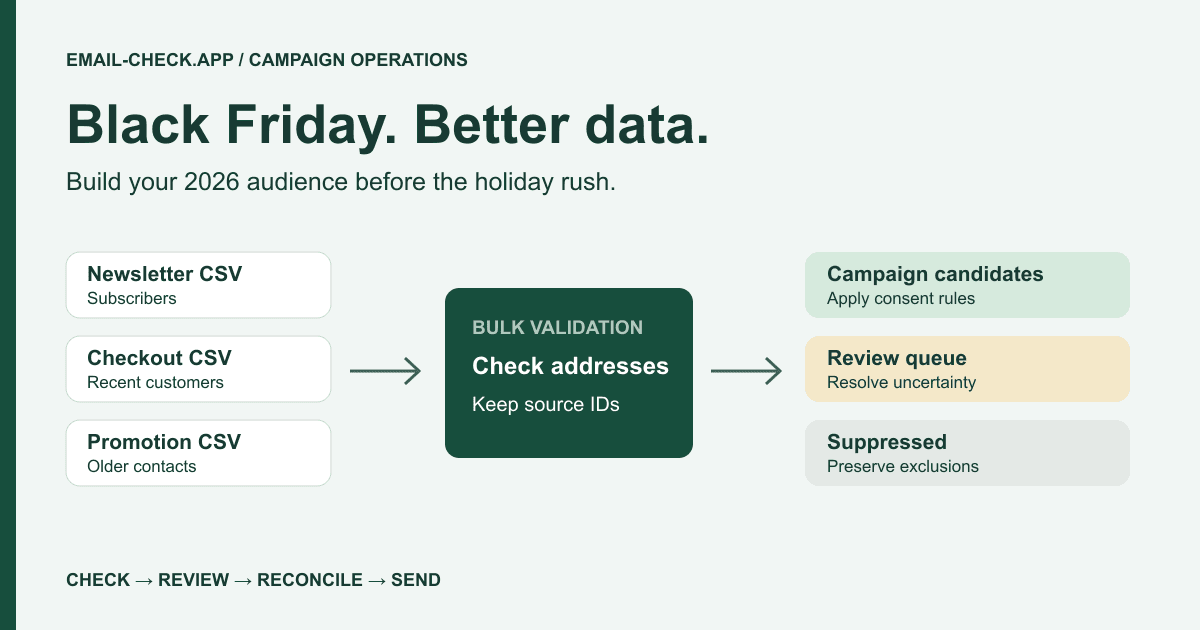
Your Black Friday audience probably comes from several places: checkout, a newsletter form, last year's promotion, and a spreadsheet someone saved for later. Putting every address into one campaign also combines every collection mistake.
A holiday discount cannot repair a misspelled domain or revive an abandoned mailbox. Before you spend on extra sends, check which contacts remain reachable and which still belong in your marketing audience. Email-Check.app provides the address checks; your email platform remains responsible for consent, suppression, and campaign delivery.
What is Black Friday email list cleaning?
Black Friday email list cleaning is the process of checking subscriber addresses, removing duplicates from the send audience, and excluding invalid or unsuitable contacts before holiday campaigns. It combines email verification with current permission, suppression, and engagement records. The output is an approved audience, plus separate records that need review.
The seasonal pressure is real. Klaviyo published its 2026 Black Friday sending guide in June, giving teams months to prepare. September is a useful point to audit collection sources and schedule the first cleanup, rather than discovering a data problem during a sale.
Freshness matters even when last year's campaign worked. ZeroBounce reports that only 62% of addresses submitted to its platform in 2025 were valid, across more than 11 billion checks. That is a vendor dataset, not a forecast for your database. Its 2026 list decay report supports checking your own data instead of assuming old records remain usable.
How to reduce holiday email bounce rates before sending
Start with suppression, validate the remaining addresses, and split the results by action. Do not delete customer history to shrink the campaign. Keep a source copy so sales, support, and marketing can explain why a contact was excluded.
1. Preserve consent and suppression records
Export eligible contacts with stable IDs, source, consent, and engagement dates. Exclude unsubscribes, complaints, and previous hard bounces before validation.
2. Upload and validate your CSV files
Upload the prepared files to the bulk checker, map the email column, and wait for each job to finish. Download the full results with validation columns.
3. Separate campaign, review, and suppression records
Inspect validity, SMTP, and disposable flags. Keep uncertain results out of the campaign and preserve consumer addresses when they belong to your audience.
4. Reconcile the final campaign audience
Join results to source IDs, deduplicate across files, and reapply current suppression records before importing the approved segment into your email platform.
Keep separate files for newsletter subscribers, recent buyers, and older promotional leads if their permissions or engagement differ. The bulk checker accepts multiple CSV files. Retain a stable contact ID and the collection source in each file. A validation result without its original record is difficult to reconcile safely.
Remove exact duplicates before uploading to avoid checking the same address repeatedly. Compare across files too: a buyer may also appear in the newsletter export. Preserve the original email value, trim accidental surrounding whitespace, and avoid rewriting mailbox names or stripping plus tags as a general deduplication rule.
After processing, download the full validated results. Useful columns include _Valid, _ValidationStatus, _ValidMX, _ValidSMTP, _Disposable, and _Free. The business-domain download filters free-provider addresses; it does not independently remove invalid rows. Inspect validity before treating either export as campaign-ready.
Give the final audience a clear owner. Record the source files, validation date, exclusion counts, and campaign name. Reapply your email platform's latest suppression list immediately before scheduling: someone can unsubscribe between export and import.
What the validation workflow checks
Syntax validation checks address structure against supported email rules, including RFC 5322 conventions. DNS and MX checks examine whether the domain has mail routing information. SMTP verification asks the receiving server about the mailbox without delivering a message. A positive response is useful evidence, but it cannot promise inbox placement.
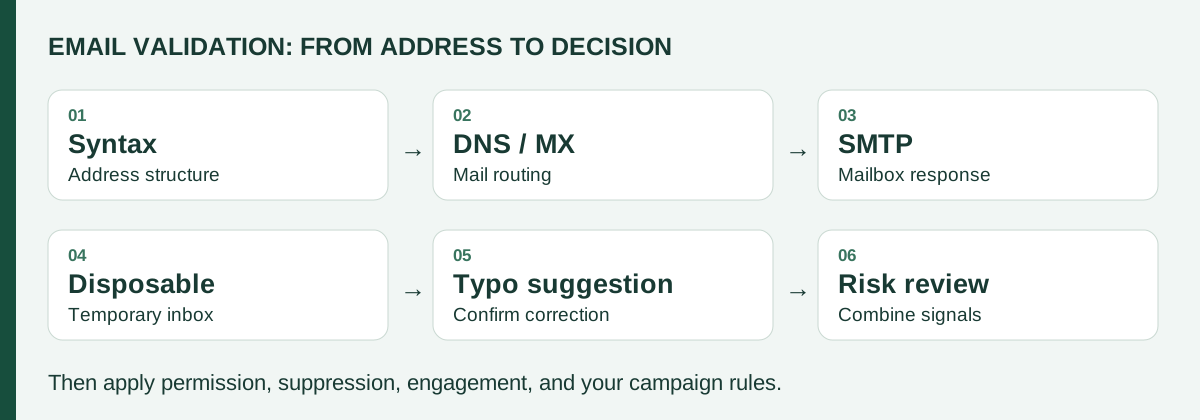
Disposable email detection identifies temporary inbox services that may expire before your next promotion. Typo suggestions flag likely mistakes such as gmial.com or yaho.com. Ask the person to confirm a correction; silently changing the address can send a receipt or offer to someone else.
The score summarizes validation signals for risk review. It does not prove identity, purchase intent, or freedom from fraud. Likewise, a name inferred from an address needs confirmation before personalizing an important message. Use the email validation guide to understand the checks and the SMTP guide to understand their limits.
| Result or type | Meaning | Holiday action |
|---|---|---|
| Valid personal mailbox | A consumer provider can host a real customer | Keep if permission and engagement qualify |
| Invalid format | The supplied address cannot pass syntax checks | Exclude and request a correction |
| Disposable inbox | A temporary provider was identified | Exclude from durable lifecycle campaigns |
| Inconclusive SMTP | The mailbox check did not establish reachability | Hold for review instead of assuming valid |
| Business or role mailbox | A domain or shared address says little about intent | Apply audience rules and confirm relevance |
Protect new holiday signups with the email check API
Bulk cleaning handles the accumulated database. A server-side check handles the next signup. Use both so a paid acquisition campaign does not refill your list with typing errors after the cleanup. Keep API credentials on your server and rate-limit your public form.
cURL: request the mailbox checks explicitly
The REST endpoint uses an x-api-key header. MX and SMTP checks are optional request parameters, so set them explicitly. Replace the example address with a record you are authorized to check. See the API reference for the response schema.
curl --get 'https://api.email-check.app/v1-get-email-details' \
  --header "x-api-key: $EMAIL_CHECK_API_KEY" \
  --data-urlencode 'email=customer@example.com' \
  --data-urlencode 'verifyMx=true' \
  --data-urlencode 'verifySmtp=true' \
  --data-urlencode 'suggestDomain=true'
JavaScript: keep validation separate from consent
// Run on your server; never expose the API key in a browser.
const url = new URL('https://api.email-check.app/v1-get-email-details');
url.search = new URLSearchParams({
  email: submittedEmail,
  verifyMx: 'true',
  verifySmtp: 'true',
  suggestDomain: 'true',
}).toString();
const response = await fetch(url, {
  headers: { 'x-api-key': process.env.EMAIL_CHECK_API_KEY },
  signal: AbortSignal.timeout(12000),
});
if (!response.ok) throw new Error('Email check needs attention');
const result = await response.json();
// This is eligibility for review, not marketing permission.
const candidate = result.validFormat === true &&
  result.validMx === true && result.validSmtp === true &&
  result.isDisposable === false && !result.domainSuggestion?.suggested;
// Apply your consent, suppression, and engagement rules next.
On a timeout, preserve the submission for review rather than enrolling it automatically. For checkout, let the shopper correct their contact information without discarding their basket. A mailbox check should not become an unexplained payment failure.
Python: filter the exported validation columns
import csv

# Use the full validated export, retaining your source contact_id column.
with open('holiday-validated.csv', newline='', encoding='utf-8-sig') as source:
    reader = csv.DictReader(source)
    fields = reader.fieldnames or []
    required = {'contact_id', '_Valid', '_ValidSMTP', '_Disposable'}
    if not required.issubset(fields):
        raise ValueError('Missing source ID or validation columns')
    with open('holiday-candidates.csv', 'w', newline='', encoding='utf-8') as target:
        writer = csv.DictWriter(target, fieldnames=fields)
        writer.writeheader()
        for row in reader:
            if (row['_Valid'] == 'Yes' and row['_ValidSMTP'] == 'Yes'
                    and row['_Disposable'] == 'No'):
                writer.writerow(row)
# Reconcile candidates with current consent and suppression before sending.
This conservative CSV filter creates candidates, not a final permission list. It deliberately keeps valid consumer mailboxes. Join the result back to your customer system, inspect remaining uncertainty, and apply campaign eligibility before import.
Calculate savings using your actual sending costs
Separate three different kinds of savings
Sending fees, stored-contact charges, and staff time follow different billing rules. Excluding a contact from one campaign may reduce attempted sends without reducing your platform subscription. Archiving a record may affect billing, but check that it preserves the suppression history you need before making that change.
Ask finance which cost actually changes when you remove an unreachable address. Then estimate savings over the planned campaign sequence, not just the first email. If the provider charges by contact tier, calculate whether the reviewed audience crosses a pricing threshold. Keep any expected sales improvement separate from confirmed invoice savings.
Agree on a review deadline
Give marketing operations time to inspect exclusions before launch. A sudden increase in invalid addresses from one checkout form can indicate a collection problem worth fixing immediately. A large unresolved group from one corporate domain may need technical review. Resolve those questions while the campaign can still change, then save the final audience count alongside the campaign brief.
Consider an illustrative retailer with 100,000 eligible records and eight planned promotional messages. Validation identifies 12,000 addresses the team excludes. That avoids 96,000 attempted sends. At an assumed incremental cost of $1 per thousand sends, direct sending savings are $96.
If validation costs $60 under the team's assumed contract, the direct net saving is $36, or 60% return on that validation spend. These are planning inputs, not Email-Check.app prices or customer results. Use current pricing and your email provider's billing rules; a fixed plan may produce no immediate cash saving.
A bounce reduction from 12% to 1.8% would be an 85% relative reduction. Treat that as a worked target, not a promised outcome. Compare equivalent audiences and the same bounce definition. Reducing bounces from 8% to 0.3% would be 96.25%, but the remaining recipients still might not open, buy, or receive the message in their inbox.
Track revenue per delivered message alongside total campaign revenue. Higher revenue per recipient can coexist with lower total sales if you excluded too many good customers. Review the hold segment separately so conservative filtering does not hide lost opportunities.
Keep sender reputation in the holiday plan
List quality is one part of deliverability. Google asks senders to keep reported spam rates below 0.10% and avoid reaching 0.30%. Those are complaint rates, not bounce-rate targets. Its sender guidelines also cover authentication and unsubscribe requirements.
Coordinate SPF, DKIM, and DMARC checks with the person who manages your sending domain. Increase volume cautiously, watch provider responses, and stop expanding a troubled segment. Validation cannot repair authentication or erase a history of complaints. No API result certifies that an address is never a spam trap.
For a B2B holiday offer, business-domain classification can help route suitable contacts to sales. For ecommerce, excluding every Gmail or Yahoo address would discard real shoppers. Personalize from confirmed purchases and preferences, using validation data to improve reachability rather than inventing customer traits.
Start with the data cleansing workflow, then review how to handle inconclusive verification results. Your release checklist should end with a reviewed audience, a suppression sync, and a monitored first send.
Black Friday email list cleaning FAQ
When should I clean my Black Friday email list?
Start several weeks before the campaign so you can review uncertain results and fix collection problems. Check new or changed addresses again near the send date, while keeping unsubscribe and complaint suppression current.
Should I remove Gmail and other free email addresses?
No, not from a consumer campaign simply because they use a free mailbox provider. Free-provider classification is useful for B2B segmentation, but it does not mean an address is invalid or disposable.
Does a business-domain CSV export contain only valid emails?
No. The business-domain export excludes addresses identified as free-provider mailboxes. You must separately inspect validity and other validation results before creating a campaign audience.
Can email validation guarantee holiday inbox placement?
No. Validation checks address quality. Authentication, permission, complaint rates, sending patterns, and recipient engagement also affect delivery and inbox placement.