June 3, 2026
Outlook 550 5.7.515 Bounce Fix with Email Validation in 2026
Microsoft authentication failures need DNS and sending-infrastructure fixes. After that, validation cleans the recipient side: stale Outlook addresses, typoed domains, disposable inboxes, and low-score contacts that can keep a campaign in bounce trouble.
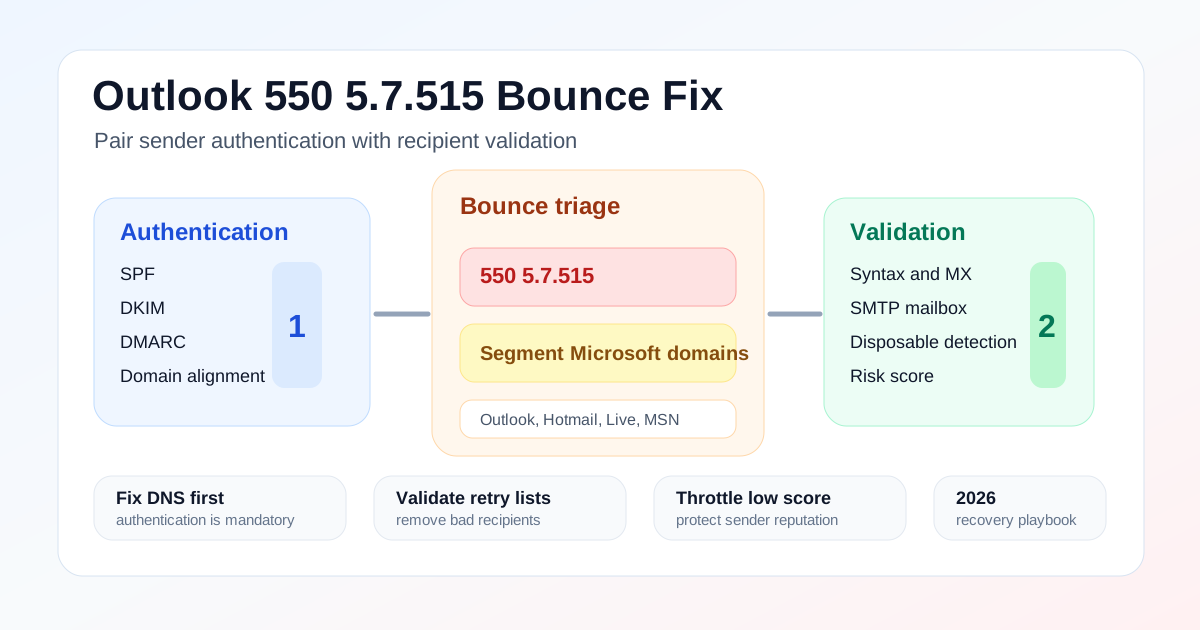
Executive Summary
Outlook 550 5.7.515 is primarily an authentication rejection pattern. Fix SPF, DKIM, DMARC, alignment, TLS, and DNS first. Then validate the Microsoft-heavy recipient segment before retrying so bad addresses do not turn a technical recovery into a sender reputation problem.
What is Outlook 550 5.7.515?
Outlook 550 5.7.515 is a Microsoft rejection pattern associated with high-volume sender requirements. In practical terms, the receiving system is telling the sender that the message does not meet the required authentication level. Microsoft announced requirements for domains sending more than 5,000 emails per day to consumer Outlook properties, including SPF, DKIM, and DMARC.
The fix starts outside the list. Review the original Microsoft high-volume sender requirements, then audit SPF, DKIM, DMARC, domain alignment, TLS, and reverse DNS with your ESP or email infrastructure owner. Validation will not repair a broken DKIM signature. It does make the next send safer once the authentication issue is resolved.
How to fix Outlook bounce risk after authentication is repaired
Once DNS and authentication are healthy, stop treating the retry as a normal campaign. Segment the failed recipients, validate them in bulk, and send only to records that pass quality checks. If the list that triggered the rejection also contains stale Outlook.com addresses, no-MX domains, disposable inboxes, role accounts, and typoed domains, the retry can still hurt reputation even after SPF, DKIM, and DMARC pass.
This is the same operating principle Google recommends for Gmail senders: keep spam rates low, follow RFC 5322 formatting, authenticate mail, confirm recipients, and monitor sender reputation. Email validation is not a substitute for consent or authentication. It is the control that prevents bad records from adding avoidable bounce evidence to an already sensitive domain.
Authentication vs email validation
Deliverability teams lose time when every bounce is discussed as one problem. Authentication, recipient validation, and engagement governance are separate layers. They reinforce each other, but they fail in different places and usually have different owners.
| Layer | What it checks | Owner | What fails |
|---|---|---|---|
| Sender authentication | SPF, DKIM, DMARC, alignment, TLS, reverse DNS, message format | Email infrastructure, IT, ESP, domain administrator | Microsoft or Gmail can reject mail before recipient quality matters. |
| Recipient validation | Syntax, MX, SMTP, disposable domain, typo, role-based, risk score | Marketing ops, growth, RevOps, product engineering | Valid infrastructure still sends to addresses that bounce or damage reputation. |
| Engagement governance | Consent, recency, opens, clicks, complaints, unsubscribe behavior | Lifecycle marketing and deliverability | Mail reaches recipients but creates spam complaints or poor engagement. |
Provider-level bounce diagnostics
Do not start with a global suppression rule. Start by reading the pattern. A Microsoft-only spike means something different from a campaign-wide hard-bounce spike. A 5.7.515 rejection means something different from invalid mailbox errors. The table below keeps the response grounded.
| Symptom | Likely cause | Validation move |
|---|---|---|
| 550 5.7.515 appears after a Microsoft-heavy send | Sender authentication or alignment issue, often SPF, DKIM, or DMARC related. | Fix DNS first, then validate the same segment before retrying. |
| Outlook bounces rise while Gmail is stable | Provider-specific reputation, Microsoft-hosted domains, or list-source skew. | Split Microsoft recipients and validate them as their own risk segment. |
| Authentication passes but bounces continue | Stale contacts, catch-all domains, invalid mailboxes, or low engagement. | Remove invalid and disposable records; review low-score and catch-all addresses. |
| Welcome emails fail for new Outlook signups | Form typos, temporary inboxes, missing MX records, or synthetic accounts. | Add real-time validation to signup and checkout forms. |
Segment Microsoft recipients before retrying
Marketing teams often retry a failed campaign after the DNS fix without looking at the recipient mix. That hides the next problem. Split Microsoft consumer domains, Microsoft-hosted business domains, Gmail, Yahoo, and other providers so you can see whether the bounce risk is provider-specific or source-specific.
| Segment | Examples | Action |
|---|---|---|
| Microsoft consumer | outlook.com, hotmail.com, live.com, msn.com | Track separately |
| Microsoft-hosted business | Company domains with Microsoft MX records | Review MX group |
| Google consumer | gmail.com, googlemail.com | Compare spam and bounce rates |
| Yahoo/AOL | yahoo.com, aol.com | Watch complaint and authentication patterns |
The validation workflow for Outlook recovery
Email-Check.app checks the recipient side in the order operators need: RFC 5322 syntax, DNS and MX records, SMTP mailbox reachability without sending a message, disposable email detection, typo correction, role-based detection, name extraction, and risk scoring. Use those results to decide whether a record should be sent, repaired, reviewed, or suppressed.
Auth audit
Segment
Validate
Suppress
Throttle
Monitor
API examples for Microsoft-heavy segments
Use the single-email endpoint for real-time form checks and for spot checks during bounce triage. The response fields can also feed a bulk workflow that tags Microsoft recipient segments before the next send.
curl -G "https://api.email-check.app/v1-get-email-details" \
  -H "accept: application/json" \
  -H "x-api-key: YOUR_API_KEY" \
  --data-urlencode "email=ops@hotmail.com" \
  --data-urlencode "verifyMx=true" \
  --data-urlencode "verifySmtp=true" \
  --data-urlencode "suggestDomain=true" \
  --data-urlencode "detectName=true" \
  --data-urlencode "checkDomainAge=true"
type BounceRiskSignal = {
email: string;
validFormat?: boolean;
validMx?: boolean | null;
validSmtp?: boolean | null;
isDisposable?: boolean;
isRoleBased?: boolean;
score?: number;
domainSuggestion?: { suggested?: string | null } | null;
};
type MicrosoftSendDecision = "send" | "repair" | "review" | "suppress";
const microsoftConsumerDomains = new Set(["outlook.com", "hotmail.com", "live.com", "msn.com"]);
function getDomain(email: string) {
return email.split("@").at(1)?.toLowerCase() ?? "";
}
export function isMicrosoftConsumerAddress(email: string) {
return microsoftConsumerDomains.has(getDomain(email));
}
export function decideMicrosoftSegment(signal: BounceRiskSignal): MicrosoftSendDecision {
if (!signal.validFormat || signal.domainSuggestion?.suggested) {
return "repair";
}
if (!signal.validMx || signal.isDisposable) {
return "suppress";
}
if (signal.isRoleBased || !signal.validSmtp || (signal.score ?? 0) < 75) {
return "review";
}
return "send";
}import csv
import requests
API_KEY = "YOUR_API_KEY"
MICROSOFT_DOMAINS = {"outlook.com", "hotmail.com", "live.com", "msn.com"}
def validate(email: str) -> dict:
response = requests.get(
"https://api.email-check.app/v1-get-email-details",
headers={"accept": "application/json", "x-api-key": API_KEY},
params={
"email": email,
"verifyMx": "true",
"verifySmtp": "true",
"suggestDomain": "true",
"detectName": "true",
"checkDomainAge": "true",
},
timeout=10,
)
response.raise_for_status()
return response.json()
def provider(email: str) -> str:
domain = email.split("@")[-1].lower()
return "microsoft_consumer" if domain in MICROSOFT_DOMAINS else "other"
with open("microsoft-risk-segment.csv", newline="") as source, open("microsoft-cleaned.csv", "w", newline="") as target:
reader = csv.DictReader(source)
fields = [*reader.fieldnames, "provider_group", "validation_status", "validation_score"]
writer = csv.DictWriter(target, fieldnames=fields)
writer.writeheader()
for row in reader:
result = validate(row["email"])
suppress = (
not result.get("validFormat")
or not result.get("validMx")
or result.get("isDisposable")
)
review = not result.get("validSmtp") or result.get("score", 0) < 75
status = "suppress" if suppress else "review" if review else "send"
writer.writerow({
**row,
"provider_group": provider(row["email"]),
"validation_status": status,
"validation_score": result.get("score", 0),
})ROI: why validation matters after a 550 event
A 550 5.7.515 event already tells mailbox providers that something about the sender needs attention. After the authentication fix, the next send should be conservative. If the retry list contains 12% bad or risky records, the domain can move from an authentication problem into a reputation problem. Reducing that risk pool to 1.8% gives the sender a cleaner recovery signal.
The financial case is straightforward. A campaign that sends to 200,000 contacts at a blended platform, operations, and opportunity cost of $0.08 per attempted contact risks $1,920 of direct waste at a 12% bad record rate. That number understates the bigger cost: throttling, suppressed inbox placement, support tickets, sales follow-up on unreachable leads, and a sender reputation recovery cycle that can take weeks.
Outlook bounce recovery checklist
- Collect the exact SMTP bounce code and provider group before changing suppression rules.
- Audit SPF, DKIM, DMARC, alignment, TLS, reverse DNS, and message formatting.
- Confirm whether the failed volume crossed the 5,000-per-day high-volume threshold for Microsoft.
- Export the Microsoft-heavy recipient segment from the failed or deferred send.
- Validate syntax, MX, SMTP, disposable status, typo suggestions, role accounts, and score.
- Suppress invalid and disposable records; repair typo records; review catch-all and low-score records.
- Retry with a smaller, high-confidence segment before returning to full volume.
- Track hard bounce rate, complaint rate, and provider-level delivery after the retry.
Related Email-Check.app guides
For the full validation pipeline, read the email validation guide. For mailbox-level checks, use the SMTP verification guide. If the problem is a rising bounce rate across all providers, use the reduce bounce rate guide. If temporary inboxes are entering your forms, pair this playbook with the disposable email detection guide.
FAQ
Can email validation fix Microsoft 550 5.7.515?
Not by itself. Fix SPF, DKIM, DMARC, alignment, TLS, and DNS first. Then use validation to clean the recipient segment before retrying the campaign.
Why do Outlook addresses bounce when Gmail looks fine?
Microsoft, Google, Yahoo, and corporate gateways score senders differently. Segment by provider so you can see whether the issue is authentication, Microsoft-specific reputation, or a bad source list.
Should I suppress every Outlook address after a 550 event?
No. Suppress records that fail validation, repair typo records, review uncertain records, and retry with high-confidence contacts. A provider-level failure is not proof that every Microsoft recipient is bad.