June 3, 2026
Email Campaign Preflight Validation: Clean Every CSV Before the Send
The best time to find invalid emails is before the campaign is scheduled, not after the bounce report arrives. Use bulk validation to turn raw CSV exports into send-ready, repair, review, and suppress segments before they touch your ESP.
Executive Summary
Email campaign preflight validation checks every campaign file before the send. Export each source list, validate the records in bulk, split them into operational segments, import only send-ready contacts, and measure bounce rate, cost per reachable contact, and source quality after launch.
What is email campaign preflight validation?
Email campaign preflight validation is the final data-quality gate before a marketing send. It verifies whether every address in a CSV can plausibly receive mail and whether the record carries risk signals that should change campaign routing. A good preflight catches malformed addresses, missing MX records, unreachable mailboxes, temporary inboxes, typo domains, role accounts, and low-confidence contacts before they create bounce noise.
That distinction matters in 2026 because mailbox providers are treating list quality as a sender-reputation signal. Google's sender guidelines tell senders to keep spam rates low, follow RFC 5322 formatting, authenticate with SPF or DKIM, and confirm recipients. Authentication gets the domain past the identity check. Clean recipient data keeps the next send from looking careless.
How to reduce email bounce rate before sending
Start with source separation. Do not merge webinar leads, paid lead lists, old customers, newsletter subscribers, and event scans into one giant file before validation. Each source has a different risk profile. A purchased list can be heavy with stale business addresses. A checkout list may include typoed Gmail and Outlook domains. A gated-content form can attract disposable inboxes from people who want the asset but not the follow-up.
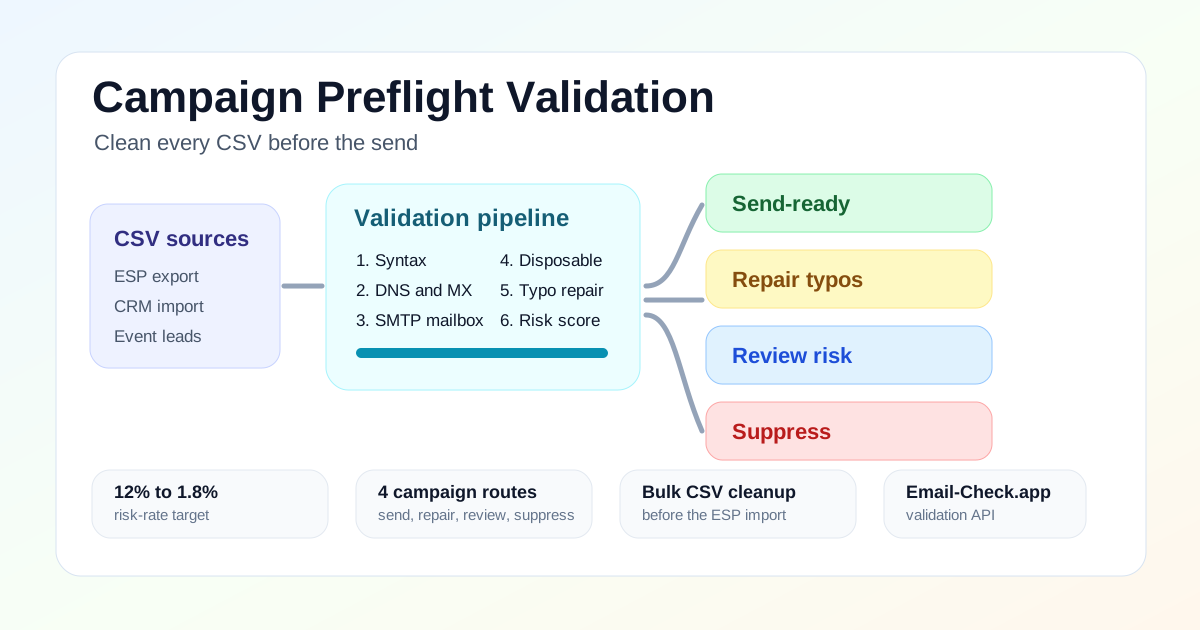
Email-Check.app validates the same operational sequence for each file: syntax check, DNS and MX verification, SMTP mailbox verification without sending mail, disposable email detection, typo correction, role-based detection, name extraction, and risk scoring. The result is not just valid or invalid. It is a routing decision that tells marketing ops what to send, repair, review, or suppress.
Export sources
Validate in bulk
Repair typos
Suppress risk
Import send-ready
Measure results
The four-list routing model
The mistake that inflates bounce rate is treating every uncertain record as sendable. Use validation results as a campaign routing system instead. Send only to records that are both reachable and low risk. Keep repair and review records available for human workflows, but do not let them leak into the launch segment by default.
| Route | Validation criteria | Campaign action |
|---|---|---|
| Send-ready | Valid format, MX present, SMTP reachable or high confidence, no disposable signal, score at or above 72. | Import to the ESP or CRM and include in the next campaign. |
| Repair | Likely typo such as gmial.com, yaho.com, hotmial.com, or missing domain characters. | Prompt the contact, correct the CRM field after confirmation, then validate again. |
| Review | Catch-all domain, role account, uncertain SMTP, low score, or sensitive source. | Hold from high-volume sends until marketing ops approves the segment. |
| Suppress | Malformed address, no MX, disposable domain, confirmed unreachable mailbox, or high-risk pattern. | Exclude from campaigns and store the reason for source-quality reporting. |
Real-time validation vs bulk CSV validation
Real-time and bulk validation solve different parts of the same problem. Real-time validation protects new forms: signup, checkout, demo request, gated content, and newsletter capture. Bulk validation cleans the records you already have: old campaigns, CRM exports, partner files, event lists, and marketing automation segments that were valid once but may not be valid now.
| Pattern | Best for | Operational outcome |
|---|---|---|
| Real-time validation | Signup forms, checkout, demo requests, gated content, newsletter capture | Stops bad records before they enter CRM or marketing automation |
| Bulk CSV validation | Existing lists, event leads, partner uploads, ESP migrations, reactivation campaigns | Cleans stale databases before a large send touches sender reputation |
| Scheduled hygiene | Quarterly database review, high-volume lifecycle programs, RevOps governance | Keeps list decay from turning into a sudden bounce spike |
API example: validate one address before routing
Use the real-time API for the form layer and for spot checks inside marketing operations tools. The same fields that protect a signup form also power campaign routing: MX status, SMTP reachability, disposable status, typo suggestion, role account flag, and score.
curl -G "https://api.email-check.app/v1-get-email-details" \
  -H "accept: application/json" \
  -H "x-api-key: YOUR_API_KEY" \
  --data-urlencode "email=buyer@gmial.com" \
  --data-urlencode "verifyMx=true" \
  --data-urlencode "verifySmtp=true" \
  --data-urlencode "suggestDomain=true" \
  --data-urlencode "detectName=true" \
  --data-urlencode "checkDomainAge=true"
type CampaignValidationResult = {
email: string;
validFormat: boolean;
validMx: boolean | null;
validSmtp: boolean | null;
isDisposable: boolean;
isFree?: boolean;
isRoleBased?: boolean;
score?: number;
domainSuggestion?: { suggested?: string | null } | null;
};
type CampaignRoute = "send_ready" | "repair" | "review" | "suppress";
export function routeCampaignRecord(result: CampaignValidationResult): CampaignRoute {
if (!result.validFormat || result.domainSuggestion?.suggested) {
return "repair";
}
if (!result.validMx || result.isDisposable) {
return "suppress";
}
if (result.isRoleBased || !result.validSmtp || (result.score ?? 0) < 72) {
return "review";
}
return "send_ready";
}
export async function validateBeforeCampaign(email: string) {
const params = new URLSearchParams({
email,
verifyMx: "true",
verifySmtp: "true",
suggestDomain: "true",
detectName: "true",
checkDomainAge: "true",
});
const response = await fetch("https://api.email-check.app/v1-get-email-details?" + params, {
headers: {
accept: "application/json",
"x-api-key": process.env.EMAIL_CHECK_API_KEY ?? "",
},
});
if (!response.ok) {
throw new Error("Email validation failed");
}
const result = (await response.json()) as CampaignValidationResult;
return { result, route: routeCampaignRecord(result) };
}Bulk CSV example: process multiple campaign files
The authenticated bulk checker is the simplest path for operators who want to upload several CSV files and download cleaned results. Engineering teams can also mirror the same routing logic in scripts for internal QA, data warehouse jobs, or campaign staging workflows.
import csv
from pathlib import Path
import requests

API_KEY = "YOUR_API_KEY"
SOURCE_DIR = Path("campaign-csvs")
OUTPUT_DIR = Path("validated-campaign-csvs")
OUTPUT_DIR.mkdir(exist_ok=True)

def validate(email: str) -> dict:
    response = requests.get(
        "https://api.email-check.app/v1-get-email-details",
        headers={"accept": "application/json", "x-api-key": API_KEY},
        params={
            "email": email,
            "verifyMx": "true",
            "verifySmtp": "true",
            "suggestDomain": "true",
            "detectName": "true",
            "checkDomainAge": "true",
        },
        timeout=10,
    )
    response.raise_for_status()
    return response.json()

def route(result: dict) -> str:
    if not result.get("validFormat") or result.get("domainSuggestion"):
        return "repair"
    if not result.get("validMx") or result.get("isDisposable"):
        return "suppress"
    if result.get("isRoleBased") or not result.get("validSmtp") or result.get("score", 0) < 72:
        return "review"
    return "send_ready"

for source_file in SOURCE_DIR.glob("*.csv"):
    with source_file.open(newline="") as source, (OUTPUT_DIR / source_file.name).open("w", newline="") as target:
        reader = csv.DictReader(source)
        fields = [*reader.fieldnames, "email_route", "email_score", "smtp_valid", "is_disposable"]
        writer = csv.DictWriter(target, fieldnames=fields)
        writer.writeheader()

        for row in reader:
            result = validate(row["email"])
            writer.writerow({
                **row,
                "email_route": route(result),
                "email_score": result.get("score", 0),
                "smtp_valid": result.get("validSmtp"),
                "is_disposable": result.get("isDisposable", False),
            })
ROI calculation: why preflight pays for itself
Suppose a lifecycle team plans a send to 100,000 contacts collected from product signups, a webinar, two paid lead vendors, and an old newsletter segment. The raw file shows a 12% invalid or risky rate. After validation, the launch list drops to 88,000 send-ready contacts, 5,000 typo or review records, and 7,000 suppressions.
| Metric | Before preflight | After preflight |
|---|---|---|
| Contacts in campaign | 100,000 | 88,000 send-ready |
| Invalid or risky share | 12% | 1.8% |
| Direct send waste | $6,500 | $1,170 |
| Deliverability | 73% | 96% |
| Primary action | Send to all records | Suppress, repair, and review first |
The direct savings are easy to see: fewer paid sends to unreachable addresses. The larger return is reputation protection. A list that moves from 12% risk to 1.8% risk gives the ESP and mailbox providers a cleaner signal. That can move deliverability from the low 70s toward the mid 90s when authentication, consent, content, and engagement are also healthy.
Campaign preflight checklist for 2026
- Export each campaign source as its own CSV, including source name and acquisition date.
- Validate every file before merging, hashing, uploading, or sequencing.
- Repair obvious typo domains such as gmial.com, yaho.com, and hotmial.com before suppressing them.
- Suppress malformed, no-MX, disposable, and confirmed unreachable records.
- Review catch-all, role-based, low-score, and high-value business records before deciding.
- Import only send-ready records into the ESP or campaign workflow.
- Save validation status, score, and reason code back to CRM or the data warehouse.
- Track bounce rate by source, not only by campaign, so vendor and form quality are visible.
Where this fits in the Email-Check.app workflow
Start with the email validation guide if you need the full validation sequence. Use the disposable email detection guide when temporary domains are driving fake leads. If bounces are already high, follow the bounce-rate reduction guide. For marketing teams, the email marketing use case and data cleansing workflow show how validation fits inside campaign operations.
FAQ
What is the fastest way to clean an email list before a campaign?
Export the list as a CSV, validate it in bulk, and import only the send-ready segment. Keep repair and review records out of the send until someone resolves them.
Can validation reduce email marketing costs?
Yes. Validation reduces direct send waste by removing unreachable addresses and reduces indirect costs by protecting sender reputation. The strongest savings show up when teams validate before every large import, reactivation campaign, and ESP migration.
Do I need SMTP verification for marketing lists?
Yes, when the list will feed high-volume campaigns. Syntax and MX checks catch obvious failures, but SMTP verification helps identify whether the mailbox can accept mail without sending a message.