April 21, 2026
Paid Lead List Validation: Clean Vendor Data Before CRM Import
Paid leads are expensive before a rep ever touches them. Validate purchased, partner, event, and AI-sourced lists before CRM import so fake emails, temporary inboxes, typo domains, and unreachable contacts do not become pipeline.
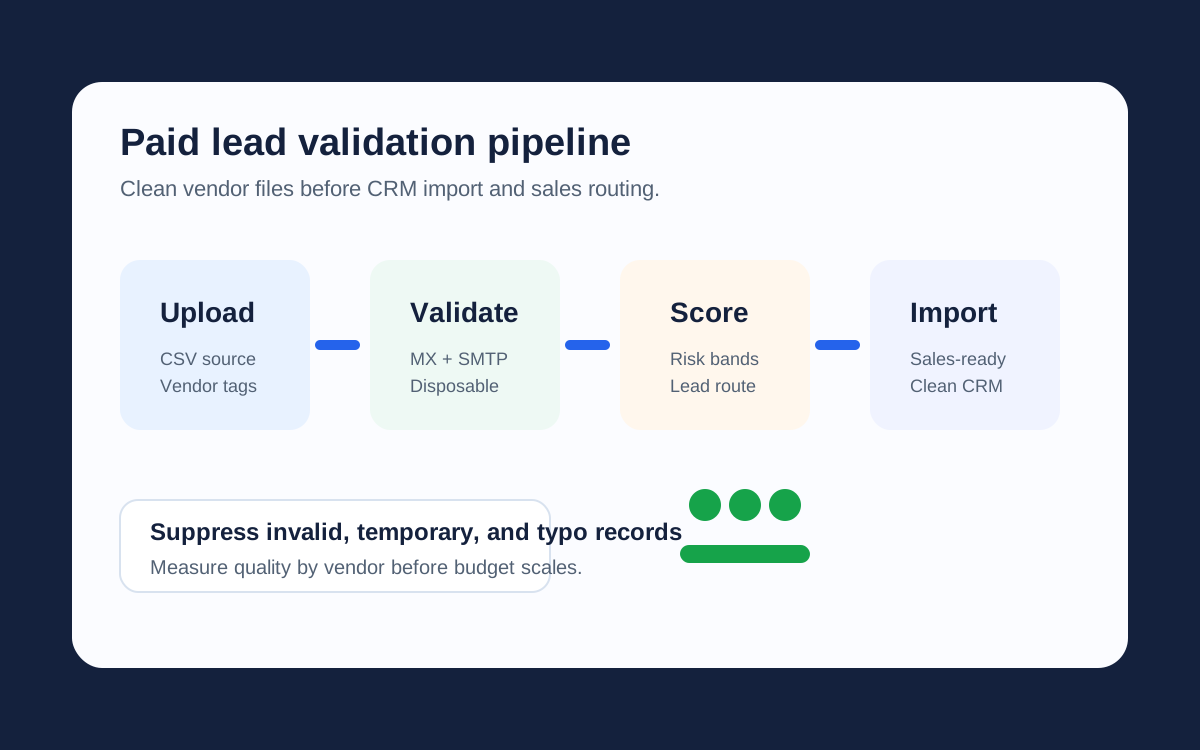
Executive Summary
Lead validation is a source-quality control, not only a deliverability tactic. Before importing a paid file, validate every address, score the risk, preserve the vendor source, and route each contact to import, nurture, repair, review, or suppression. The result is cleaner CRM data, fewer wasted sequences, and a harder fraud surface for forms and quote requests.
What Is Paid Lead List Validation?
Paid lead list validation is the process of checking every purchased, partner, event, webinar, affiliate, or AI-sourced email address before it enters CRM. The check looks beyond syntax. A lead can look normal, pass a basic regex, and still be useless for sales: no MX records, unreachable mailbox, disposable domain, shared role account, typo domain, or a risk score too low for outbound.
This matters because lead acquisition has become faster and messier. Teams pull contacts from forms, enrichment vendors, ad partners, webinars, field events, scraped research, AI prospecting tools, and spreadsheets passed between agencies. A 2026 academic study of the lead marketing ecosystem found rapid downstream sharing, brokered lead flows, and aggressive follow-up after form submission. Growth teams need a quality gate before that data touches CRM, sales automation, or paid retargeting audiences.
A clean import protects more than email deliverability. It protects rep time, attribution, customer profiles, campaign budget, and trust in the lead sources marketing pays for.
How to Validate Paid Leads Before CRM Import
Keep the original source fields. If the vendor sends lead_source, campaign, event_name, or capture_url, preserve them. Validation is much more useful when RevOps can compare supplier quality, not only individual addresses.
Then run the file through the full validation chain: syntax check, DNS and MX verification, SMTP mailbox verification without sending an email, disposable domain detection, typo correction, role-based email detection, name extraction, and risk scoring. Email-check.app bulk upload supports multiple CSV files, which lets teams clean vendor files before merging them into HubSpot, Salesforce, Mailchimp, Klaviyo, or a custom data warehouse.
Upload
Import CSV files with source fields intact.
Validate
Run MX, SMTP, disposable, typo, and score checks.
Route
Map every lead to import, nurture, review, repair, or suppress.
Report
Measure invalid and risky rates by vendor or campaign.
Lead Import Actions by Validation Result
| Lead Type | Validation Signal | CRM Action |
|---|---|---|
| Named business contact | Valid MX, SMTP reachable, high score, non-disposable. | Import to sales queue. |
| Personal webmail lead | Reachable inbox but not a business domain. | Nurture or score lower for B2B sales. |
| Temporary inbox | Disposable domain detected. | Suppress and report to vendor. |
| Typo domain | Suggestion returned, such as gmail.com for gmial.com. | Repair only after confirmation. |
| Role account | info@, admin@, support@, billing@, or similar pattern. | Review; do not assign directly to SDR sequences. |
| Unreachable mailbox | Valid syntax but failed MX or SMTP checks. | Suppress before import. |
REST API Example for One-Off Lead Checks
Use real-time validation for forms, enrichment workflows, and sales tools that inspect one contact at a time. Use bulk upload for vendor files and campaign lists.
curl -G"https://api.email-check.app/v1-get-email-details" \
 -H"accept: application/json" \
 -H"x-api-key: YOUR_API_KEY" \
 --data-urlencode"email=ops@newvendor.example" \
 --data-urlencode"verifyMx=true" \
 --data-urlencode"verifySmtp=true" \
 --data-urlencode"suggestDomain=true" \
 --data-urlencode"detectName=true" \
 --data-urlencode"checkDomainAge=true"
JavaScript Routing Rule for CRM Import
This rule keeps the CRM boundary explicit. Only strong business contacts move straight to sales. Repairable records go to correction, uncertain contacts go to review, and bad data never enters the import.
type LeadValidationResult = {
 validFormat?: boolean;
 validMx?: boolean;
 validSmtp?: boolean;
 isDisposable?: boolean;
 isRoleBased?: boolean;
 isFreeProvider?: boolean;
 score?: number;
 detectedName?: { firstName?: string | null; lastName?: string | null } | null;
 domainSuggestion?: { suggested?: string | null } | null;
};

type LeadImportAction ='import_to_sales' |'nurture' |'repair' |'review' |'suppress';

export function mapLeadImportAction(result: LeadValidationResult): LeadImportAction {
 if (!result.validFormat || result.domainSuggestion?.suggested) {
 return'repair';
 }

 if (!result.validMx || result.isDisposable) {
 return'suppress';
 }

 if (result.isRoleBased || !result.validSmtp || (result.score ?? 0) < 70) {
 return'review';
 }

 return result.isFreeProvider ?'nurture' :'import_to_sales';
}
Python Vendor Scorecard
After validation, summarize quality by source. This turns a vague vendor conversation into numbers: suppression rate, review rate, repair rate, and true import rate.
import csv
from collections import Counter, defaultdict

def summarize_vendor_quality(path: str) -> dict[str, Counter]:
 summary: dict[str, Counter] = defaultdict(Counter)

 with open(path, newline="") as source:
 for row in csv.DictReader(source):
 vendor = row.get("lead_source","unknown")
 action = row.get("import_action","review")
 summary[vendor][action] += 1

 return summary

for vendor, counts in summarize_vendor_quality("validated-leads.csv").items():
 total = sum(counts.values())
 suppress_rate = counts["suppress"] / total if total else 0
 print(vendor, total, f"{suppress_rate:.1%} suppressed", counts)
Real-Time vs Bulk Validation for Lead Generation
| Workflow | Use Real-Time Validation When | Use Bulk Validation When |
|---|---|---|
| Quote and demo forms | The visitor is submitting the email now. | You need to audit old submissions. |
| Purchased lead files | A sales user checks one record before outreach. | A vendor delivers hundreds or millions of rows. |
| Event scans | A badge scanner writes directly to CRM. | The event export arrives as CSV after the show. |
| AI prospecting | An agent proposes a single contact for review. | A tool exports an entire target-account list. |
ROI: The Cost of Importing Bad Leads
Bad leads tax every system they touch. If a vendor file has 50,000 rows and 12% are invalid, 6,000 records can waste enrichment credits, CRM storage, sales automation sends, routing logic, and SDR attention before anyone notices. If validation reduces that invalid pool to 1.8%, the risky records fall from 6,000 to 900. That leaves 5,100 contacts that do not consume campaign sends, damage sender reputation, or make a paid source look stronger than it is.
The bigger savings often come from routing. A valid personal inbox may be fine for a newsletter but weak for enterprise outbound. A role account may receive mail but fail as a named sales lead. A newly registered domain may deserve fraud review before a trial, order, or quote request. Validation data lets teams customize email content, prioritize business contacts, and suppress low-trust records without inventing separate rules in every tool.
Use the Same Signals to Protect Forms
Paid list cleanup and form protection should share one policy. If the import process suppresses disposable domains, the demo form should not accept them either. If typo correction recovers leads in a CSV, the signup form should show the suggestion before the visitor leaves. If low-score addresses go to review, order forms and trial forms can use the same review queue to reduce fake account creation and fraud waste.
Start with the public guides for email validation, disposable email detection, and SMTP verification. For campaign preparation, pair this article with the Gmail spam-rate recovery playbook and the lead generation use case.
FAQ
Should paid lead validation happen before or after deduplication?
Do light normalization and deduplication first if it is available, then validate the remaining unique addresses. Keep source fields so the scorecard still shows which vendor created the issue.
Should every valid email enter sales automation?
No. Valid only means reachable enough to consider. Use business-domain status, role detection, engagement context, and risk score before deciding whether sales, nurture, or review is the right path.
Can validation reduce fake account creation?
Yes. Disposable detection, SMTP checks, typo correction, domain age, and risk scoring make fake signup systems harder to scale, especially when validation runs before account creation.